Free during early access
Shadow any YouTube video,
sentence by sentence.
ShadowPlay breaks the audio into ~5-second sentence clips. Each one plays, pauses for you to repeat aloud, then plays again. Offline-capable, no signup.
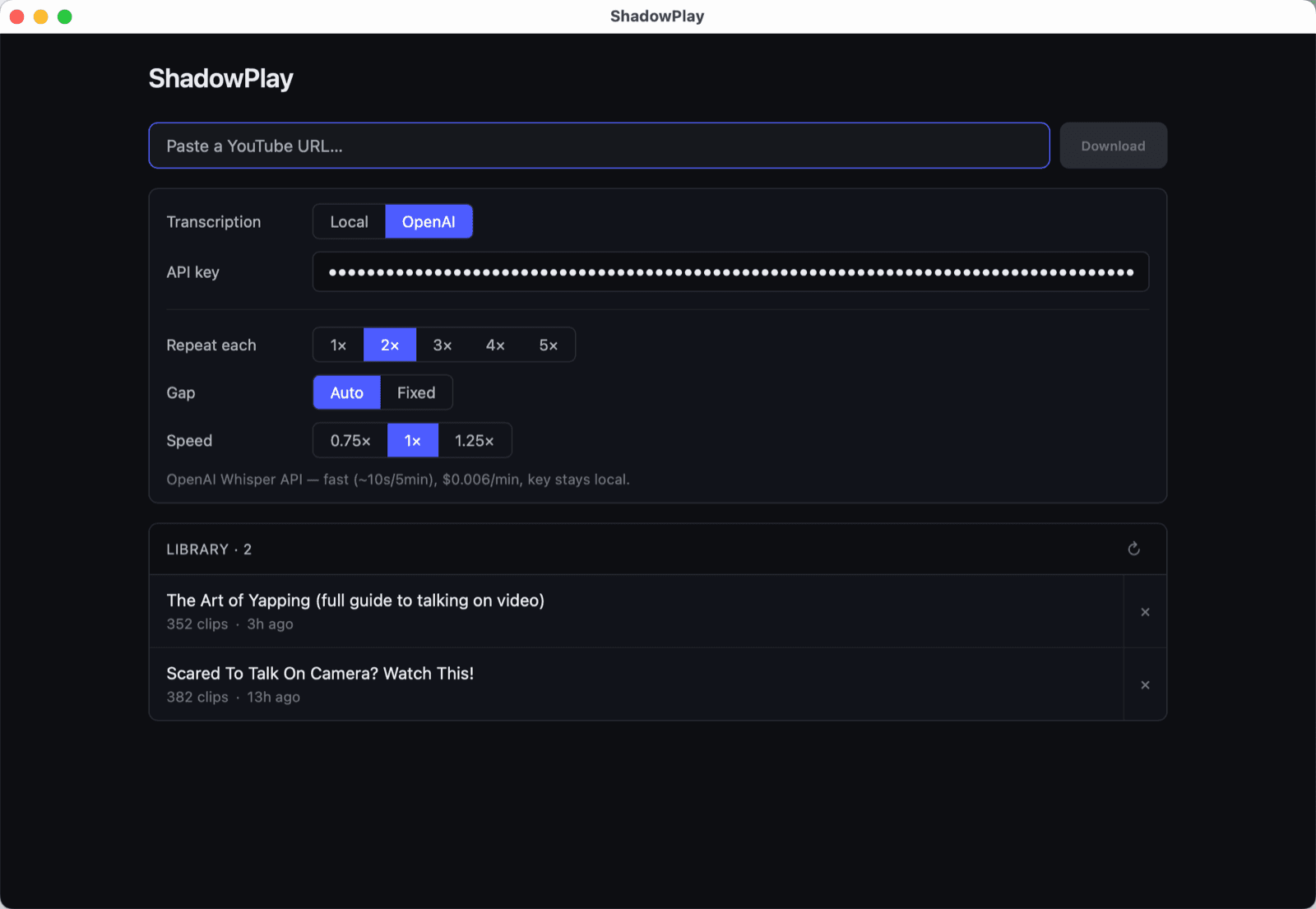
What you get
Sentence-perfect clips
Word-level transcription cuts the audio at exact sentence boundaries — no clipped words, no dead air between.
Repeat with a gap
Each clip plays N times, with a pause equal to the clip's own length so you have time to repeat aloud.
Your library, saved
Every transcribed video is cached. Re-paste a URL or click it from the library to load instantly.
How it works
Paste a YouTube URL
Any video that yt-dlp can reach. Download is automatic.
Pick a transcription engine
Local whisper.cpp runs entirely on your computer — free, offline, private. Speed depends on your machine (real-time on a modern CPU, slower on older hardware). Or use the OpenAI Whisper API for predictably fast results (~10s for a 5-min video, $0.006/min — your API key stays local).
Press play and shadow
The app plays each sentence on a loop with the gap of your choice. Click any clip in the list to jump.
Step-by-step walkthrough
- 1
Install
Download the installer above. On Windows, run the
ShadowPlay_x64-setup.exeinstaller. On Mac, open the.dmgand drag ShadowPlay to Applications. - 2
Pick a transcription backend
On first launch you'll see the Settings panel. Local runs whisper.cpp on your computer — free and offline. If you'd rather pay a small per-minute fee for predictably fast cloud transcription, paste an OpenAI API key (you can get one at platform.openai.com). Either works the same once it's done.
- 3
Paste a URL and click Download
ShadowPlay downloads the audio, transcribes it, and breaks it into sentence clips automatically. With OpenAI, a 5-minute video takes about 10–15 seconds. Local transcription time depends on your hardware.
- 4
Tune your shadowing settings
Repeat each: 1×–5× plays per clip.
Gap: Auto (= the clip's own duration, ideal for repeating aloud) or Fixed (set your own seconds).
Speed: 0.75×, 1×, or 1.25× — pitch stays natural. - 5
Press play
Each sentence plays, pauses for the gap, and plays again. The current clip is highlighted in the list — click any other clip to jump there.
- 6
Come back to it later
Every transcribed video is saved to your library. Close the app and reopen — your videos are still there, ready to play instantly.
Companion app · iOS
Take it on your phone
ShadowPlay can hand off any video to a companion iOS app — same controls, same gap-and-repeat playback, on your phone. From the desktop app, click Export for iPhone on any video and AirDrop the file to your phone.
The iOS app is currently sideload-only — building TestFlight distribution is on the roadmap.
Common questions
Is it free?
ShadowPlay is free to download and use during early access. Pricing may be introduced later as the product matures — early users will get plenty of notice. The optional OpenAI Whisper API has its own per-minute cost (~$0.006/min) paid to OpenAI directly; the local engine has no usage cost.
Where does my OpenAI API key go?
It stays on your computer — saved in the app's local settings, sent only to OpenAI's API endpoint, never to us.
What videos work?
Anything yt-dlp can reach: regular YouTube videos, Shorts, age-unrestricted content. Long videos (over 25 MB of audio) get auto-compressed before upload.
Does it work offline?
Yes — pick the Local transcription backend. You'll need an internet connection to download the YouTube audio (yt-dlp), but transcription runs entirely on your computer with whisper.cpp.
System requirements?
Windows 10 or later (64-bit). macOS 10.15 or later. Both Intel and Apple Silicon Macs are supported.
Ready to start shadowing?
More options on GitHub Releases.