How to shadow with ShadowPlay (a 5-step routine that works)
A practical session you can run in 15 minutes a day. Tied to the actual app — repeat counts, gap settings, speed.
5 min read · Apr 30, 2026
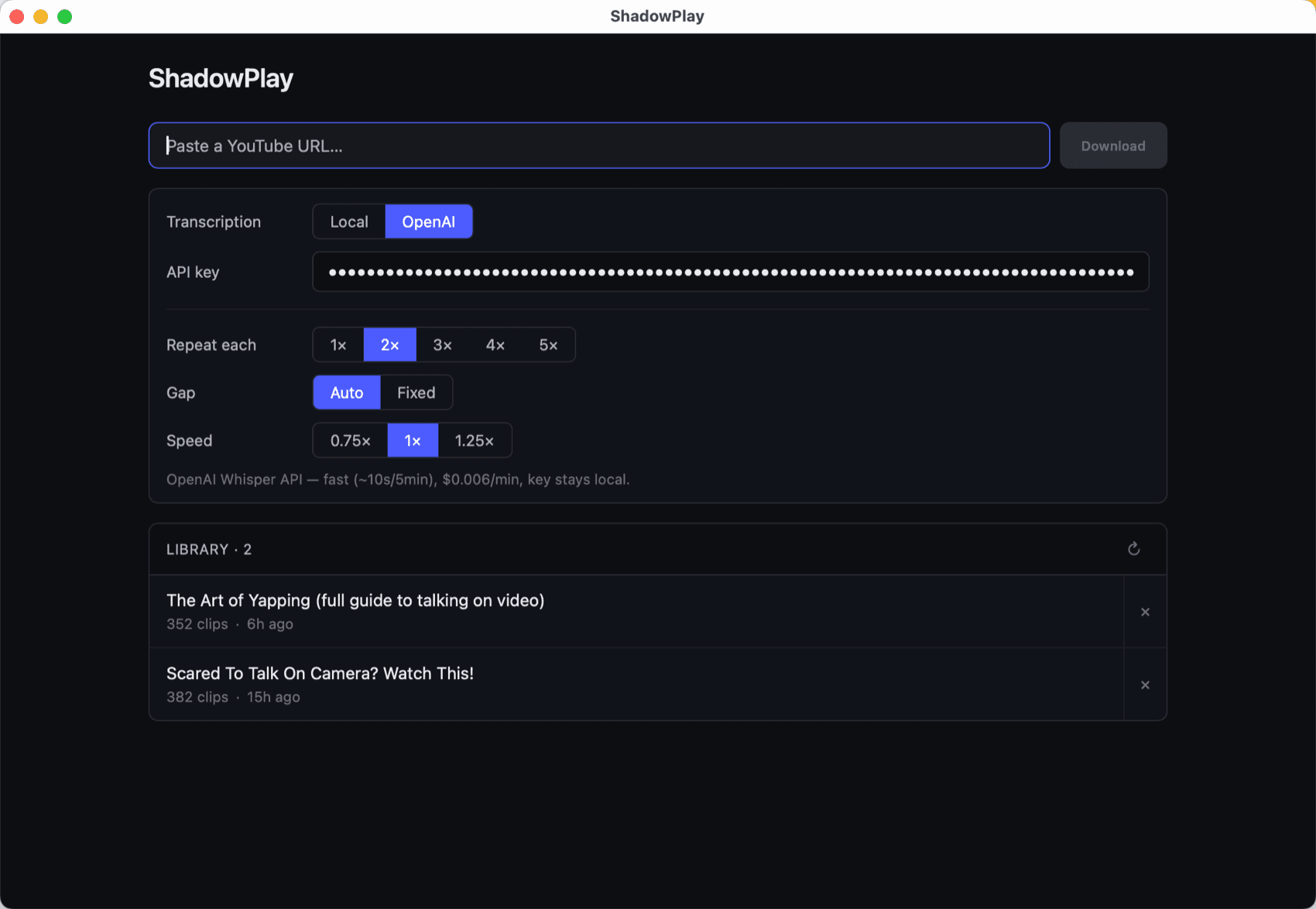
ShadowPlay's job is to take any YouTube video and turn it into a shadowing routine you can finish in 15 minutes. Here's how to use it well — not just open it.
Step 1 — Pick a video that's slightly too fast for you
The biggest mistake is choosing audio that's comfortable. If you can already shadow it perfectly on the first try, you're not building anything new. Pick a video where the speaker talks just a notch faster than you'd normally follow. You should feel the strain.
Good genres to start: a TED talk, a casual YouTuber vlog, a podcast clip. Avoid music videos and anything with heavy background noise — the transcription quality drops, and noise makes it harder to hear the model speaker clearly.
Pick one accent and stick with it for at least a few weeks. American, British, Australian — it doesn't matter which, but it matters that you commit. Shadowing partly copies a person, not just a language. If you swing between very different accents in the same week, your output gets muddy and none of the patterns lock in. Pick the accent that's most useful to you (the one your future conversations are likely to be in) and let your mouth specialize before you broaden out.
Step 2 — Set repeat to 2× and gap to Auto
Open the settings panel and start with these defaults:
- Repeat each: 2×. Each clip plays, then gives you a gap, then plays again, then gives you another gap. The first gap is your “try-it” pass; the second is your “cleaner-this-time” pass.
- Gap: Auto. The pause after each play equals the clip's own length. If a sentence is 4 seconds long, you get 4 seconds of silence to recall it and say it back at speed — exactly the time you need.
- Speed: 1× for now. Don't slow down yet.
Step 3 — Warm-up: listen, don't speak
Hit play. For the first 10-15 clips, don't say anything — let the gaps pass in silence. You're just letting your ear adjust to the speaker's rhythm and getting a feel for which clips will be easy and which will fight back.
Click any clip in the list to re-hear something specific. Use this pass to spot the words that already feel hard.
Step 4 — Shadow during the gap
Restart the video from the top. Now you're going for it. The crucial part: let the clip finish, then say it back during the gap. Don't talk over the speaker. The whole reason ShadowPlay puts a pause after every play is to give your brain time to recall the line and your mouth time to deliver it at speed. Talking along while the speaker is still speaking feels easier — but it skips the recall that's doing the actual work.
- Listen to the clip in full. Don't start your own voice until the speaker is done.
- In the silent gap, repeat the whole sentence at full speed, matching the speaker's rhythm. Where they paused, you pause. Where they pushed, you push.
- If you can't remember the whole thing, that's the point — your recall is being trained. Say what you got, then replay the clip and try again.
- If a clip is genuinely too fast, drop the speed to 0.75× for that one. Push back to 1× as soon as you can keep up.
- When a clip flows out clean, hit next. When you stumble, replay until your mouth stops fumbling.
Step 5 — Save and come back tomorrow
Every video you transcribe is automatically saved to your library. Tomorrow, instead of starting fresh, reload the same video and run the same routine again. Your second session will feel dramatically different — clips that crushed you yesterday will feel half as fast.
After 3-4 sessions on the same video, retire it and pick something a tier harder. The goal isn't to master one video, it's to keep raising the speed and difficulty your mouth can handle.
What about variety?
Shadowing the same speaker every day teaches you that speaker's patterns. That's useful, but you also need variety so your skills don't over-fit one voice. Two cheap ways to mix it up:
- Keep two or three videos in rotation — one casual conversation, one TED-style talk, one podcast. Switch between them on different days.
- Drop into today's round for a quick five-clip variety pack with fresh voices.